
The operational problem
Attendance device integrations fail when hardware events arrive without business context: unknown employees, missing branches, invalid codes, and no owner for failed punches.
Integration
Attendance hardware is part of the operating model, so the system treats it like a first-class integration surface.
4
Operating steps
3
Expected outcomes
Integration
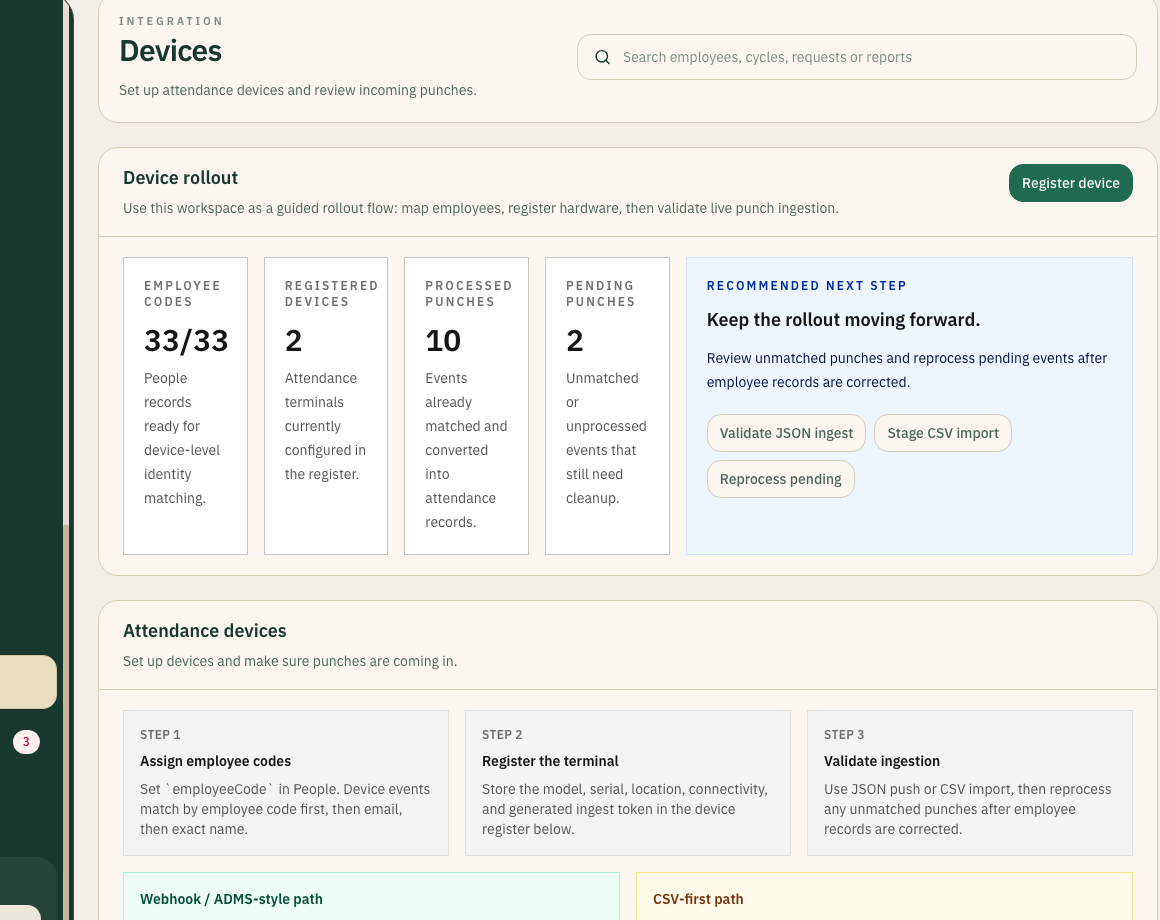
Use the devices workspace to register hardware, validate events, and resolve pending ingestion issues.
Inside this view
Visible
Execution state
Owned
Exception flow
The operational problem
Attendance device integrations fail when hardware events arrive without business context: unknown employees, missing branches, invalid codes, and no owner for failed punches.
How the operating model changes
NxtGenSoftware treats attendance devices as operational infrastructure. The integration includes registration, mapping, ingestion, validation, and exception ownership.
Best suited for
Bring device registration, event ingestion, and exception handling into the platform.
See device integration supportWorkflow
Register each terminal with location, owner, token, and rollout state.
Map employee codes to workforce records before production use.
Ingest events through JSON or CSV and validate results.
Route unmatched punches to an owner for correction.
Implementation notes
Detail
Keep device details, tokens, and rollout status in one place.
Detail
Support operational testing and staged rollout through structured ingest paths.
Detail
Treat unmatched punches as visible follow-up work rather than silent failures.
Next step
If this page matches the problem your team is trying to solve, the next useful move is a structured conversation around rollout and operating fit.
Continue